
Download Voiceflow – Build AI Agents, Chat & Voice Apps Securely
Why Voiceflow Stands Out in the AI Agent Marketplace
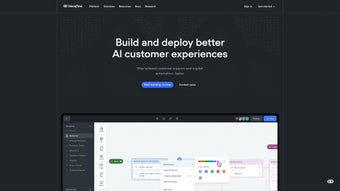
Voiceflow is a cloud‑native, web‑based platform that lets teams of any size design, develop, and launch conversational AI experiences without writing extensive code. The tool’s visual Workflow Builder lets you drag‑and‑drop intents, slots, conditional branches, and API calls onto a single canvas, turning complex dialogue trees into a clear, editable diagram. Collaboration sits at the heart of Voiceflow: designers can sketch prototypes, developers can add custom JavaScript actions, and product managers can comment directly on blocks, keeping feedback loops short and transparent. Because the application runs in the browser, you can access your projects from Windows, macOS, Linux, Android, or iOS devices, and the underlying infrastructure on Amazon Web Services and Google Cloud Platform provides auto‑scaling, low latency, and enterprise‑grade security certifications such as ISO 27001 and SOC 2. In a crowded market of niche chatbot builders, Voiceflow’s all‑in‑one approach—combining no‑code prototyping, a built‑in Knowledge Base, robust analytics, and a powerful API—makes it a compelling choice for businesses that need to move from idea to production quickly while maintaining control over data privacy and scalability.
Comprehensive Overview and Core Feature Set
Voiceflow’s interface is purpose‑built for speed and clarity. The central canvas visualizes each conversational element as a block, allowing you to connect intents, capture user slots, and embed conditional logic with a single click. A built‑in Knowledge Base stores reusable prompts, responses, and snippets, automatically versioning every change so teams can revert or compare revisions effortlessly.
The Data Management System acts as a single source of truth for all assets, eliminating duplication and ensuring consistency across multiple projects or language versions. For developers, Voiceflow offers a full suite of low‑code tools: a JavaScript editor for custom actions, webhook support for real‑time external calls, and a comprehensive REST API that lets you push data to CRMs, ticketing systems, or analytics dashboards. Ready‑made connectors simplify integration with popular collaboration and voice platforms such as Slack, Microsoft Teams, Google Assistant, and Amazon Alexa, while the export feature lets you generate JSON, CSV, or platform‑specific packages in seconds.
- Drag‑and‑drop Workflow Builder for rapid prototyping
- Centralized Knowledge Base with version control
- Data Management System for organized prompt storage
- Built‑in testing environment with real‑time voice simulation
- Secure, auto‑scaling hosting on AWS and GCP
- Extensive API & webhook support for custom integrations
- Collaboration tools: comments, role‑based permissions, and shared libraries
- Export options to JSON, CSV, or directly to Alexa/Google Assistant formats
- Analytics dashboard for interaction metrics and performance tracking
- Multi‑language support for global deployments
The platform also includes a “high‑fidelity prototype” mode that generates a near‑production experience, which you can share with stakeholders via a secure link. This feature dramatically reduces the time required for user testing, allowing decision‑makers to provide feedback on a realistic simulation rather than a static wireframe. Overall, Voiceflow consolidates the entire conversational AI lifecycle—ideation, design, testing, deployment, and monitoring—into a single, browser‑based workspace, removing the need for multiple licenses or disparate tools.
Getting Started: Installation, Usage Guidelines, and System Compatibility
Voiceflow is delivered as a Software‑as‑a‑Service (SaaS) solution, so there is no traditional installer to download. To begin, navigate to voiceflow.com, click “Sign Up,” and create a free account using your email address or Google SSO. An onboarding wizard guides you through selecting a project template—Chatbot, Voice App, or Custom AI Agent—setting the default language, and configuring a fallback response for unrecognized inputs. After the initial setup, you can invite teammates by email, assign roles such as Designer, Developer, or Viewer, and start building on the shared canvas.
Within the workspace, use the left‑hand component library to drag blocks onto the canvas. Keyboard shortcuts (Ctrl + C, Ctrl + V, Delete) accelerate editing, while the searchable component bar lets you locate specific actions in seconds. For advanced scenarios, toggle “Developer Mode” to open a JavaScript editor where you can write custom functions, define environment variables, and configure webhook endpoints for real‑time data exchange with external services. The built‑in emulator provides both text‑based and voice‑based testing; you can also pair a physical device—such as an Amazon Echo or Google Nest—using a generated pairing code for end‑to‑end verification.
Because Voiceflow runs entirely in the browser, it is compatible with all modern operating systems: Windows 10/11, macOS Monterey and later, major Linux distributions, as well as mobile browsers on Android 12+ and iOS 14+. The platform follows WCAG 2.1 guidelines, ensuring accessibility for users with screen readers or keyboard‑only navigation.
When your agent is ready for launch, select “Export,” choose the target platform (Alexa, Google Assistant, custom web chat, etc.), and Voiceflow handles packaging, validation, and submission. Enterprises that require on‑premise hosting can opt for a private‑cloud deployment, which mirrors the public SaaS environment while keeping all data behind the organization’s firewall. Throughout the process, version history, change logs, and role‑based permissions keep your project secure and auditable.
Pros, Cons, Frequently Asked Questions, and Final Verdict
Pros
- Fast visual development eliminates the need for extensive coding.
- Robust collaboration tools keep cross‑functional teams aligned.
- Scalable cloud hosting on AWS/GCP guarantees performance and security.
- Extensive integrations and open API enable limitless customization.
- High‑fidelity prototyping shortens feedback loops and reduces time‑to‑market.
Cons
- Advanced custom logic still requires JavaScript knowledge.
- Pricing for premium features can be steep for very small startups.
- Limited offline capability – requires an internet connection for full functionality.
Frequently Asked Questions
Is there a free tier for Voiceflow?
Yes. Voiceflow offers a free plan that includes unlimited projects, basic components, and up to 1,000 interactions per month, making it ideal for hobbyists and small teams.
Can I export my agent to multiple platforms?
Absolutely. Voiceflow provides one‑click exports to Amazon Alexa, Google Assistant, custom web chat, and even raw JSON for bespoke deployments.
How does Voiceflow handle data security?
All data is encrypted at rest and in transit. The platform leverages AWS IAM roles and GCP Cloud Security to enforce strict access controls, and compliance certifications include ISO 27001 and SOC 2.
Do I need programming experience to use Voiceflow?
No. The visual builder lets non‑technical users create functional bots. However, developers can extend capabilities with custom code for complex scenarios.
What support options are available?
Voiceflow offers a knowledge base, community forum, live chat for paid plans, and priority email support for enterprise customers.
Review Summary
Voiceflow combines an intuitive no‑code builder with powerful developer extensions, making it suitable for both beginners and seasoned AI engineers. The platform’s real‑time collaboration, extensive analytics, and secure cloud infrastructure set it apart from many competitors. While the free tier is generous, larger teams should budget for the premium plans to unlock higher interaction limits and advanced support.
Conclusion – Should You Download Voiceflow?
Voiceflow delivers a compelling blend of ease‑of‑use, powerful collaboration, and enterprise‑grade scalability. If your organization wants to prototype AI agents quickly, iterate with cross‑functional teams, and launch to major voice platforms without wrestling with infrastructure, this tool is a solid investment. The free tier allows you to explore its capabilities risk‑free, while the paid plans unlock advanced analytics, higher interaction limits, and dedicated support. Ready to accelerate your conversational AI projects? Create your free account today and start building AI agents that delight users and drive business results.



.png)



